


Blog
Basic Information about Fulfillment by Amazon (FBA) for New Sellers
Table of Content
1. What is Fulfillment by Amazon (FBA)?
2. Benefits of FBA for Sellers
3. Steps to Shipping via FBA
3.1. product preparation
3.2. packaging guidelines
3.3. labeling
4. FBA fulfillment costs
5. FBA storage costs
6. Other FBA costs
7. GKE Logistics Solution
1. What is Fulfillment by Amazon (FBA)?
Fulfillment by Amazon (FBA) is a program that lets you outsource order fulfillment to Amazon and offer customers free, two-day shipping through Prime. By enrolling in FBA, you can send your products into Amazon’s global network of fulfillment centers, and Amazon will pick, pack, and ship orders, as well as handle customer service and returns. FBA is part of a fully automated set of services called Amazon Supply Chain Services (ASCS).
2. Benefits of FBA for Sellers
Increasing Sales
Use FBA to deliver orders with the speed and reliability customers love. That can help you increase sales and repeat purchases.
Grow your business
Amazon network includes hundreds of fulfillment centers worldwide and can help you reach customers around the globe.
Operate with greater ease
Instead of spending time processing orders, handling customer inquiries, and managing returns, use FBA to focus on developing products and delighting customers.
3. Steps to Shipping via FBA
Register for FBA
Sign up for a selling account, or log in to Seller Central if you already have one. To register for FBA, select the gear icon, then Account info. Then select Manage on the Seller Account Information page and click Register for FBA.
List and assign products to FBA
You can select some or all of your eligible products for FBA. Before deciding which products to select:
-
Confirm your products are eligible by reviewing FBA product restrictions.
-
Review FBA policies and requirements.
-
Estimate costs using our Revenue Calculator.
You can assign new products during the standard listing process by selecting Amazon will ship and provide customer service (FBA), or change an existing listing to FBA.
Steps to Shipping via FBA
Transport your products to an Amazon fulfillment center using the Send to Amazon workflow. The workflow will guide you through the shipment-creation process, including preparing, packing, and labeling your inventory.
3.1. Product preparation.
Prep is required when product packaging is not sufficient to protect the products during shipping and handling. On the Send to Amazon: Choose inventory to send, by clicking your product’s prep category to open the Prepare your FBA items window you can see if your item has specific preparation requirements or if you can edit your product’s prep guidance.
3.2. Packaging guidelines
Amazon may refuse, return, or repackage items with non-compliant packaging or labels at your expense without reimbursement.
Amazon may add specific requirements to a product due to damages and damage-related returns. Moreover, certain products have other specific requirements. A unit that falls under multiple categories must be prepped according to all applicable prep types.
3.3. Labeling.
Each box and pallet you ship to an Amazon fulfillment center, including one or more units sent in a manufacturer box, must be properly identified with a unique box ID and pallet label. When you provide box content information during the shipment creation workflow, each FBA box ID label will contain the information for a specific box.
Example: FBA box ID label
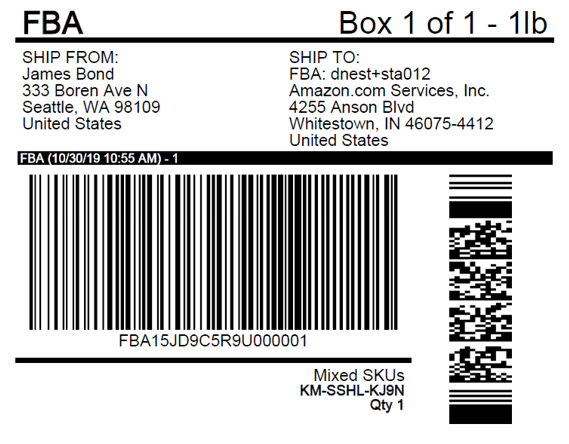
When creating a shipment for Amazon FBA, sellers must print FNSKU labels and pack goods according to Amazon’s standards regarding size, materials, and arrangement. Goods are then transported to Amazon warehouses via sea or air.
To save time and effort, use FBA Prep Service and FBA Label Service.
Optimize and expand your business
Use a suite of FBA services to help streamline your operations. Pair FBA with programs like Amazon Global Logistics, Remote Fulfillment with FBA, and Amazon Export to help reach more customers around the world. Learn more with the FBA beginner’s guide and other key training videos.
4. FBA fulfillment costs
The fulfillment cost per unit includes picking and packing your orders, shipping and handling, customer service, and product returns. Costs are based on the weights and dimensions of your product. Shipping weight is calculated based on the item’s unit weight or dimensional weight.
5. FBA storage costs
Inventory storage costs are charged monthly based on the daily average volume (measured in cubic feet) for the space your inventory occupies in Amazon fulfillment centers. The volume measurement is based on unit size when properly packaged and ready to ship.
Additional inventory storage costs apply to products classified as dangerous goods and for sellers who have a high volume of inventory stored relative to the volume of their recent weekly sales.
6. Other FBA costs
Aged Inventory
Charged monthly for all items stored in a fulfillment center for more than 181 days. Maintaining sound inventory health can help you avoid this cost.
Returns processing
Charged on orders when Amazon provides a customer with free return shipping.
Removal, disposal, and liquidation orders
You can have Amazon return, dispose of, or liquidate your inventory in a fulfillment center for a per-item charge.
7. GKE Logistics Solution
GKE Logistics has recently launched an optimized FBA shipping solution for B2B FBA orders. Our ALL-IN cost includes Freight charges + import duties + customs clearance fees + VAT with fast and stable shipping time at only 4–7 business days. By utilizing DDP (Delivered Duty Paid) terms for direct delivery to Amazon warehouses, our service stands out as the most optimized solution in the current market.
GKE Logistics has just reviewed the essential steps of the Amazon operating process with you. If you are ready for your first order, let GKE Logistics accompany you on every cross-border journey!
Thu Phuong (Jun)
Contact
GKE Logistics is always with you 24/7. Even outside of working hours, we still receive online requests and provide the fastest possible support.